Enable Hibernate Mode in windows 7
Windows 7 doesn’t have a Hibernate option out of the box, as you might have noticed. However, you can bring it out of hiding and make it an option for you when powering down your PC.

Enable Hibernate in Windows 7
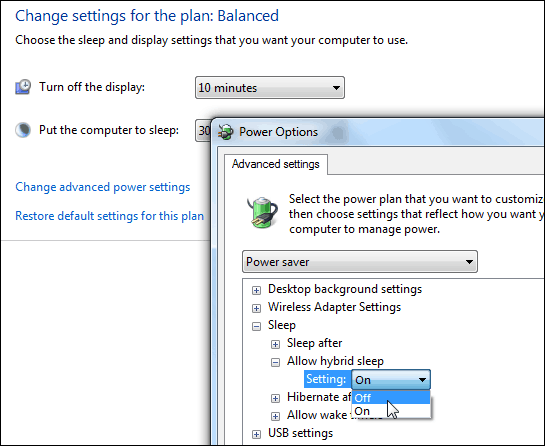
First click Start and Type: power options in the search box and hit Enter. Next in the right hand pane select Change when the computer sleeps and then click Change advanced power settings.
In the Power Options window expand Allow hybrid sleep and switch it to Off and click OK.
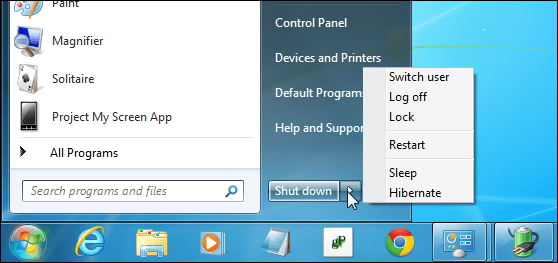
Now you’ll have your Hibernate option listed on the power button.
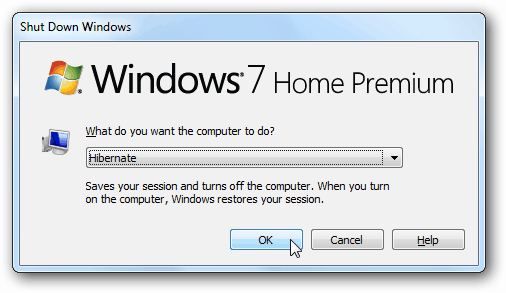
After enabling Hibernate, it will also show up in other locations like if you use the keyboard shortcut Alt + F4 to get the Shut Down Windows options.
This adds the Hibernate feature and doesn’t replace anything, so you’ll still have the Restart, Log off, and Sleep options too.


Comments
Post a Comment